If your phone videos only look shaky during quick handheld clips, a 3 axis smartphone stabilizer may be more gear than you need. It starts to make sense when you walk while filming, want cleaner pans, or record yourself without someone behind the camera. The important question is not whether a gimbal makes video smoother, but whether the kind of movement you shoot is the kind it can actually improve.
How a 3 axis smartphone stabilizer works
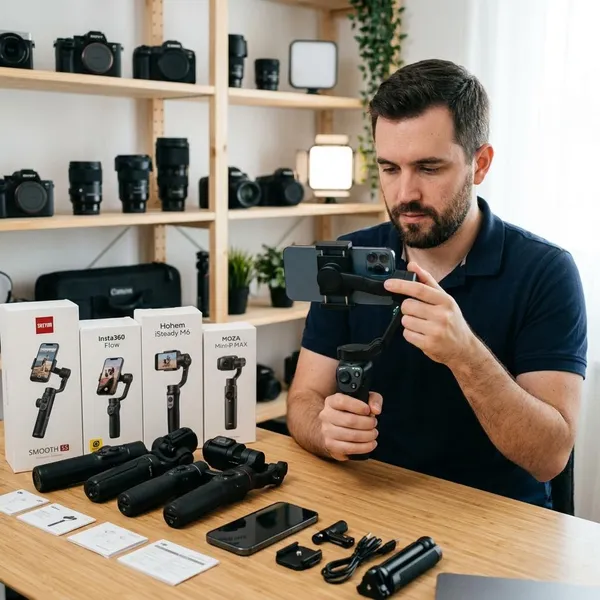
A phone gimbal uses small motors and motion sensors to keep your phone steadier while your hand, wrist, or body moves. Unlike software stabilization, which corrects the image digitally, a gimbal physically supports the phone before the footage is captured.
The "3 axis" part matters because each axis controls a different kind of movement: pan, tilt, and roll. Together, they make camera movement look more deliberate instead of nervous or accidental.
Pan controls left and right turns
Pan is the side-to-side movement you use when following someone across a room, turning toward a view, or sweeping across a street scene. A gimbal softens the start and stop of that turn, so the shot feels less like a quick wrist twist and more like an intentional camera move.
Tilt controls upward and downward angles
Tilt is useful when you move the phone up or down, such as showing a table setup and then the person speaking, or starting low and lifting toward a tall building. By supporting that angle change, the stabilizer helps prevent the small jumps that often happen when your grip shifts mid-shot.
Roll keeps the horizon level
Roll controls the sideways lean of the phone. If your hand dips, the horizon or a row of shelves can suddenly look tilted. The roll motor helps keep those horizontal lines level, which is one of the quickest ways to make phone footage look calmer.
When a smartphone gimbal is worth using
A smartphone gimbal is most worth using when the camera itself needs to move. If you mainly film a plate of food, a quick talking clip at a desk, or a static scene, your phone's built-in stabilization may already be enough. If you film while walking through a market, following your child on a path, recording room tours, or making social videos alone, the difference is easier to see.
Walking and follow shots
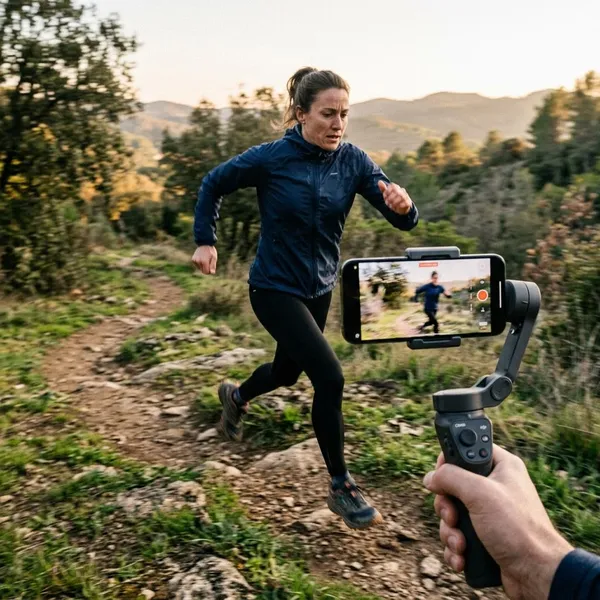
Walking shots are one of the strongest reasons to use a gimbal, but they are also where expectations need to stay realistic. The gimbal can keep the phone pointed more steadily while you follow a person, pet, or moving subject, yet your steps still affect the final result.
- Good fit: travel walks, family outings, event clips, room tours.
- Less useful: running, fast direction changes, rough ground, or anything that needs action-camera-style movement.
- Best habit: slow down, bend your knees slightly, and keep your arm relaxed.
Slow pans and reveals
Slow pans and reveal shots are where a gimbal can make an ordinary phone clip feel much more controlled. A decorated room, a dinner table, a garden corner, or a product on a counter all look better when the movement starts smoothly and does not twitch halfway through.
This is a good reason to buy one if you enjoy making short videos that look planned rather than just captured in a hurry.
Solo filming with supported tracking
Solo filming can be easier if the gimbal and app support face or subject tracking. This helps when recording workouts, teaching clips, cooking demos, or talking videos where you move around and still need to stay in frame.
Treat tracking as a convenience feature, not a guarantee. It can depend on your phone, lighting, app support, and how quickly you move. If you plan to use it for important content, test it at home before trusting it during a real shoot.
What a 3 axis stabilizer cannot fix
A gimbal improves camera movement, but it does not repair every problem in a video. Some issues come from how you walk, some from the phone's camera settings, and some from asking a small motorized device to do more than it was designed for.
Vertical bounce from walking
A 3-axis gimbal controls pan, tilt, and roll, but it does not fully remove the up-and-down motion of your body. If you walk normally with heavy steps, the footage can still bob. Slower steps and a softer walking style often improve the shot as much as the gimbal itself.
Motion blur from camera settings
Motion blur is a camera issue, not a stabilization issue. In dim rooms or at night, your phone may use a slower shutter speed, so moving people, pets, or quick pans can still look smeared even if the phone is physically steady.
If indoor footage looks blurry, try adding light, slowing the camera movement, or using a camera app with more control if your phone supports it. A gimbal can make the motion smoother, but it cannot turn a blurry frame into a sharp one.
Movement beyond the motor limits
Every phone gimbal has limits for phone weight, size, balance, and motor movement. If the phone is too heavy, mounted badly, or whipped around too quickly, you may see vibration, drifting, tilted framing, or overload warnings.
What to check before buying a phone gimbal
Start with fit, not features. The best tracking mode or shooting preset will not matter if your phone barely fits, the case blocks movement, or the app does not work well on your device.
Think about your real use as well. Someone who wants a gimbal for a vacation needs something quick to pack and set up. Someone filming weekly product clips at home may care more about stable operation, app controls, and battery life.
Phone size and weight limits
Check the supported phone width and payload before anything else. Large phones, Pro/Max models, and phones with heavy cases can push a gimbal close to its limit. If your setup is right on the edge, the motors may work harder and the footage may be less reliable.
Clearance for cases and accessories
Cases, lens attachments, microphones, magnetic mounts, and small lights can all change how the phone sits in the clamp. Even if the phone fits, an accessory may hit the motor arm when you tilt or rotate.
- Film casually on trips: a slim case may be fine if the phone balances cleanly.
- Record with a mic or lens: check clearance carefully before buying.
- Hate removing your case: avoid models that only work comfortably with a bare phone.
App and tracking compatibility
Basic stabilization often works without much app involvement, but tracking, gesture control, special modes, firmware updates, and record controls may depend on the manufacturer's app. Android support can vary more by model, so recent user feedback is worth checking.
If tracking is the main reason you want a gimbal, do not judge only by the feature list. Look for examples from people using a similar phone, especially if you plan to film yourself moving around a room.
Battery life and charging
Battery life matters most when the gimbal leaves the house. For short clips at home, almost any decent runtime may be enough. For travel days, events, or repeated takes, a weak battery becomes annoying quickly.
Also check how it charges. USB-C is convenient if it matches your other devices, and some models can help charge the phone while filming. Treat that as a bonus, not a replacement for carrying enough phone battery for longer shoots.
Packed size and carrying weight
A bulky gimbal often becomes drawer gear. If you want it for holidays, walks, family days, or quick social clips, folded size and setup speed matter almost as much as stabilization quality.
Weight is a trade-off. A heavier grip can feel steady for planned shots, but it gets tiring when filming one-handed. For occasional travel use, choose the gimbal you will actually bring; for regular home recording, comfort and controls may matter more than pocketability.
How to set up a smartphone stabilizer
Most beginner problems come from rushing the setup. A phone that is clamped off-center, poorly balanced, or connected to the wrong mode can make a good gimbal feel worse than it is.
The process does not need to be complicated: mount the phone securely, balance it as required, connect only the features you need, then test the movement before recording anything important.
Mount and position your phone
Place the phone firmly in the clamp and make sure the holder is not pressing the power or volume buttons. Decide on horizontal or vertical filming before you balance, because changing orientation can affect how the phone sits.
Check balance as the manual requires
Balance requirements vary by model. Some compact gimbals need only rough centering, while others require you to slide an arm until the phone stays reasonably level before power-on.
Do not skip this if your manual asks for it. Poor balance can cause buzzing, drifting, shorter battery life, or motor strain. If the phone falls hard to one side when the gimbal is off, adjust it before switching on.
Power on and connect supported features
Turn the gimbal on after the phone is mounted and balanced. Then connect Bluetooth or the companion app if you need record controls, tracking, firmware updates, gesture control, or special shooting modes.
For a low-pressure family clip, basic stabilization may be enough. For a solo tutorial or paid-looking product video, test the app connection, tracking, and framing before the real take so you are not troubleshooting while filming.
Choose a mode and test your movements
Pick the mode that matches the shot, then rehearse for a few seconds. Pan-follow, lock mode, follow mode, and selfie mode can feel very different depending on the gimbal.
- Try a slow pan to check whether the movement starts smoothly.
- Walk a few steps to see how much bounce remains.
- Tilt up and down to confirm the phone has enough clearance.
- Review the clip before filming the version you care about.
Conclusion
A 3 axis smartphone stabilizer is a smart buy if movement is a regular part of your videos and you are willing to carry one, set it up properly, and move with a little care. If you mostly shoot quick static clips, your phone may already be enough; if you film walking shots, smooth reveals, room tours, or solo content, a well-matched gimbal can make your footage look steadier with less trial and error.