A size comparison of smartphones is most useful when it helps you predict comfort, not just screen area. Start by comparing your current phone's width and weight, then decide whether you want easier one-handed use, a balanced daily phone, or a larger screen for games, video, and work. Screen inches matter, but the phone's body shape often decides whether you enjoy using it every day.
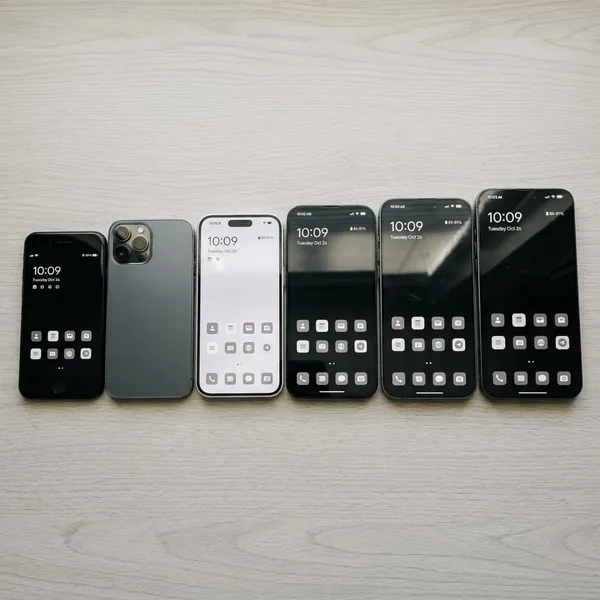
Common smartphone size ranges
Phone sizes are usually described by screen size, measured diagonally across the display. That number is a helpful starting point, but it does not tell you how wide, heavy, or pocket-friendly the phone will feel.
| Size range | Best fit | Main trade-off |
|---|---|---|
| Under 6.1 inches | One-handed use, pockets, quick messaging | Less room for video, typing, and multitasking |
| 6.1 to 6.4 inches | Everyday use for most people | Not as compact as small phones, not as roomy as large ones |
| 6.5 inches and up | Gaming, streaming, reading, work apps | More weight and harder one-handed handling |
Compact phones under 6.1 inches
Compact phones make the most sense if you value control and portability over maximum screen space. They are easier to use while walking, standing on a train, holding a bag, or quickly replying to a message with one hand.
The compromise is space. Long typing, spreadsheets, split-screen apps, and long video sessions can feel cramped. If your phone is mostly for calls, messaging, music, maps, and quick browsing, that trade-off is often worth it.
Standard phones around 6.1 to 6.4 inches
This is the safest size range for many buyers because it gives enough screen for modern apps without becoming too awkward to carry. A standard phone usually works well for browsing, camera use, maps, shopping, social apps, and short video sessions.
Do not assume every phone in this range feels the same. A narrow 6.4-inch phone can feel easier to hold than a wider 6.1-inch model, so compare body width before deciding that one is "too big" or "small enough."
Large phones from 6.5 inches and up
Large phones are best when the screen is a real priority. They are more comfortable for gaming, streaming, reading long pages, editing documents, video calls, and using two apps side by side.
- Choose one if: your phone often replaces a tablet or laptop for media or work.
- Be careful if: you use your phone one-handed often or keep it in tight pockets.
- Check before buying: weight, width, and whether your usual grip still feels secure.
Which smartphone size is right for you?
The best size depends on your routine more than the label on the box. A phone that feels perfect on the sofa can be annoying during a commute, and a phone that feels sleek in photos may be too wide once you add a case.
Use your current phone as the reference point. If it already feels heavy, do not move to a larger model just for a nicer screen. If you often zoom, squint, or avoid doing tasks on your phone because the display feels tight, moving up one size range may make sense.
Compact phones for one-handed use
For one-handed use, a compact or narrow phone is usually the best choice. Width matters more than the diagonal screen number because it controls how far your thumb has to reach and how securely your fingers wrap around the frame.
A compact phone is especially useful for commuting, walking, taking quick photos, checking directions, or replying to messages while your other hand is busy. If you often use a case, include that extra bulk in your judgment.
Standard phones for everyday use
Standard phones are the easiest recommendation when you want one device that does most things well. They give more room for reading and typing than compact phones, while staying more manageable than the biggest models.
- Good for: messaging, photos, browsing, maps, social apps, and casual video.
- Usually fine for: mixed household use, students, parents, and general daily tasks.
- Possible issue: people with smaller hands may still prefer the narrowest model in this range.
Large phones for gaming and streaming
Larger phones usually feel better for gaming and streaming because controls, subtitles, maps, and interface details have more space. If you watch shows on public transport or play games for longer sessions, the extra display area is not just cosmetic.
The catch is hand fatigue. A big, heavy phone can become uncomfortable faster than expected, especially in landscape mode. For gaming, compare weight and grip shape as carefully as refresh rate or processor claims.
Large phones for work and multitasking
A large phone can be worth it if you regularly read documents, manage email, join video calls, review spreadsheets, or use split-screen features away from a desk. The extra space reduces zooming and makes small buttons easier to tap.
If you travel light or carry your phone in a pocket all day, a standard model may be the better work choice. Productivity is not only about screen size; it also depends on whether the phone is comfortable enough to use often.
What matters beyond screen size?
After screen size, check width first, then weight, thickness, bezel size, and aspect ratio. These details explain why two phones with similar displays can feel completely different in normal use.
A simple buying mistake is choosing the largest screen that fits your budget. A better approach is to ask what bothers you about your current phone: is it too wide, too heavy, too small for reading, or simply awkward with a case?
Width affects grip and thumb reach
Width is often the most important comfort measurement. A few extra millimeters can make the far side of the keyboard, back gesture, or top corner harder to reach, even if the screen size increase looks small on paper.
If you want a quick test, compare the new phone's width with your current phone rather than only comparing display inches. If your current phone is already at your grip limit, a wider model will probably push you into two-handed use.
Weight affects long-term comfort
Weight matters most during long sessions: reading in bed, gaming, scrolling on the sofa, or holding the phone during a video call. A heavier phone can feel premium for a minute in a shop and tiring after half an hour at home.
Thickness affects pocketability
Thickness changes both pocket comfort and grip. A thin phone slides into tight pockets more easily, while a slightly thicker phone may feel more secure in the hand, especially with rounded edges or a grippy case.
Think about where the phone lives during the day. Jeans, gym shorts, small bags, car mounts, and coat pockets all make thickness feel different.
Bezels affect overall body size
Bezels are the borders around the screen. Thin bezels let a phone carry a larger display without growing as much in height or width, which is why a newer phone can feel smaller than an older phone with the same screen size.
Aspect ratio affects how the phone feels
Aspect ratio affects whether a phone feels tall and narrow or shorter and wider. Tall, narrow phones can be easier to grip and better for scrolling through text or feeds, while wider shapes may feel roomier for typing, games, or certain videos.
This is one reason screen size alone can mislead you. Two phones can both be listed as 6.5 inches, yet one feels slim and pocketable while the other feels broad and harder to control.
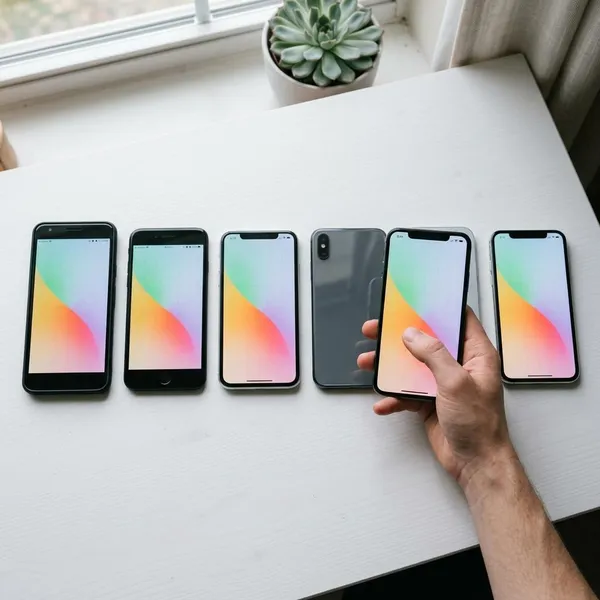
Why can phones with the same screen size feel different?
Phones with the same screen size can feel different because the display is only one part of the design. Body width, height, weight, bezels, aspect ratio, and weight distribution all affect how the phone sits in your hand.
This matters most when upgrading from an older model or choosing between two phones that look similar in spec sheets. Do a side-by-side comparison against your current phone if you can, because small changes are easier to understand when you have a familiar reference.
Narrower phones are easier to hold
A narrower phone usually feels safer and more relaxed in one hand. Your fingers wrap around it more easily, and you are less likely to shift the phone awkwardly just to reach the opposite side of the display.
Thinner bezels reduce overall size
Thinner bezels make the front of the phone more efficient. A phone with slim borders can offer a generous screen while keeping the body smaller than an older design with thicker borders.
If you are upgrading after several years, this can be a pleasant surprise: the screen may get bigger while the phone does not feel dramatically larger.
Different aspect ratios change body shape
Different aspect ratios change the phone's footprint. A taller shape may show more vertical content and stay easier to grip, while a wider shape can feel more spacious but less comfortable for smaller hands.
- For reading and feeds: taller screens often feel natural.
- For typing: some users prefer a little extra width.
- For one-handed use: avoid width that already feels close to your limit.
Weight changes the in-hand feel
Two phones with nearly identical dimensions can still feel different if one is noticeably heavier. Camera modules and internal layout can also make a phone feel slightly top-heavy, which may force a tighter grip.
When comparing two close options, use this order: width for grip, weight for fatigue, height for pocket fit, then thickness and bezel design for overall feel.
Conclusion
The right smartphone size is the one that fits your real routine, not the one with the biggest number on the spec sheet. If you want comfort and easy control, protect width and weight first; if your phone is your main screen for games, video, or work, a larger model can be worth the bulk. Comparing every option against the phone you already use is the simplest way to avoid buying something that looks good online but feels wrong every day.