If you are comparing xiaomi robot vacuum x20+ reviews, the useful question is not whether it can replace every bit of manual cleaning. It is whether it can take over enough daily vacuuming and mopping to justify the big dock, the water tanks, and the ongoing upkeep. For homes with mostly hard floors, some rugs, pets, or regular foot traffic, the Xiaomi X20+ makes the most sense; for thick carpet-heavy homes or very cramped layouts, it is less convincing.
Xiaomi X20+ vacuuming performance
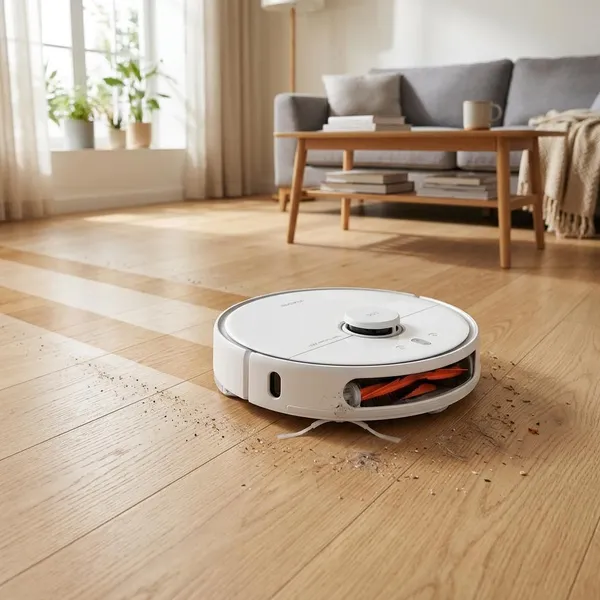
The Xiaomi X20+ is strongest as a routine cleaner. Its listed 6,000Pa suction, LiDAR mapping, side brush, and self-emptying dock are built around frequent cleaning rather than occasional deep cleaning. That distinction matters: a robot that runs three or four times a week often gives a cleaner-looking home than a more powerful vacuum that only comes out when the floor already looks bad.
Hard floor cleaning
Hard floors are where the Xiaomi X20+ is easiest to recommend. Tile, laminate, vinyl, and sealed wood give the robot a flat surface where it can collect dust, crumbs, grit, and light food debris without fighting carpet fibers.
Carpet cleaning
On low- and medium-pile carpets, the X20+ should handle surface dirt, hair, crumbs, and everyday dust well enough for maintenance cleaning. It is not the machine I would choose as the only vacuum for a home with thick wall-to-wall carpet, because robot vacuums still have limited brush pressure compared with a full-size upright.
| Floor situation | Buying judgment |
|---|---|
| Mostly hard floors with a few rugs | Strong fit; you get both vacuuming and mopping value. |
| Low carpet in bedrooms | Good for upkeep between deeper manual vacuuming. |
| Thick carpet throughout the home | Less ideal; deep cleaning will still depend on another vacuum. |
Pet hair pickup
Pet owners are one of the better matches for the Xiaomi X20+. Frequent runs stop fur from turning into clumps along skirting boards, under dining tables, and around sofa legs. The self-emptying dock also helps because pet hair fills a small robot bin quickly.
The trade-off is brush maintenance. If you have a shedding dog, a long-haired cat, or several people with long hair at home, plan to check the roller and side brush regularly. Auto-emptying reduces bin work, but it does not magically remove wrapped hair from moving parts.
Edge and corner cleaning
Edge cleaning is decent for a round robot, not perfect. The side brush can flick debris away from baseboards and furniture legs, but sharp corners, narrow gaps, and awkward chair clusters still need occasional help from a handheld vacuum or crevice tool.
Everyday debris handling
The X20+ is best judged by normal messes: cereal crumbs after breakfast, dust under the dining table, grit near the front door, pet fur in the hallway, and dry kitchen debris. These are exactly the jobs where scheduled cleaning pays off.
- Best use: regular maintenance before dirt builds up.
- Use stronger suction: rugs, pet zones, and entry areas.
- Do not expect: deep carpet agitation or perfect corner cleaning.
Xiaomi X20+ mopping performance
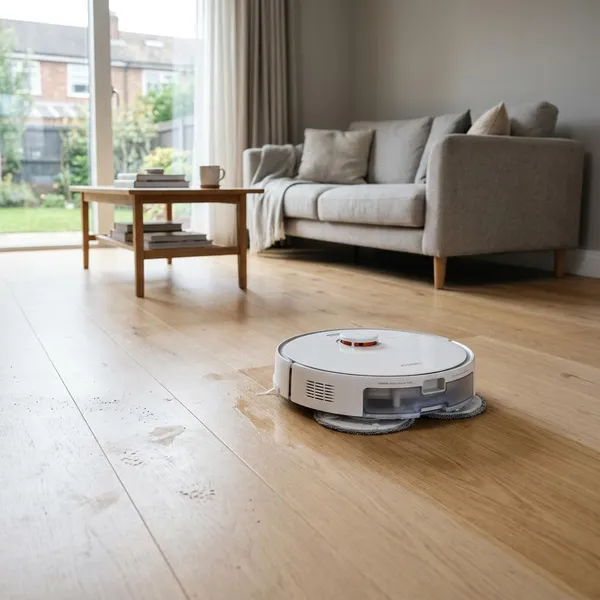
The mopping system is the main reason to consider the X20+ over a simpler vacuum-only robot. Instead of dragging a damp cloth, it uses two rotating mop pads, and the dock can wash those pads during use. That makes the mop function feel more like a real maintenance tool, especially on kitchens, corridors, and open-plan hard floors.
It is still a maintenance mop, not a replacement for every manual cleanup. The right expectation is cleaner floors during the week, with occasional hand cleaning for sticky spills, corners, and tight bathroom areas.
Dual rotating mop pads
The dual rotating pads are a meaningful upgrade over passive cloth mopping. They can loosen light grime, footprints, dusty film, and mild scuff marks better than a flat pad that simply trails behind the robot.
Stain and spill cleaning
Fresh marks are the realistic target. Muddy paw prints, light drink residue, and everyday kitchen marks are the kind of messes the X20+ can reduce well, especially if you send it out soon after the mess happens.
Dried sticky spills are a different story. If sauce, syrup, or sugary liquid has dried overnight, expect to spot-clean by hand or run an extra pass. A common mistake is treating the robot as a stain remover; it is better used to stop normal grime from settling in.
Carpet handling and mop lifting
The Xiaomi X20+ can raise its mop pads when it detects carpet, with the lift height commonly listed at about 7mm. That helps in mixed-floor homes where a tiled kitchen connects to a rug or carpeted living area.
Be more careful with thick, fluffy, or high-value rugs. The safest approach is to use the app to create no-mop or restricted zones for anything you would not want touched by damp pads, even briefly.
Mixed floor cleaning
Mixed floor layouts are where the X20+ feels most useful. A typical example is a home with hard flooring in the kitchen and hallway, rugs in the living room, and carpet in bedrooms. The robot can vacuum, mop, lift its pads, and follow room-specific settings instead of forcing you to split every cleaning job manually.
- Hard-floor rooms: use vacuum and mop together.
- Rug areas: allow vacuuming, but check mop-lift clearance first.
- Delicate floors: lower water output and avoid over-wetting.
Areas that still need manual cleaning
Manual cleaning is still needed around toilet bases, tight cabinet edges, deep corners, dried sticky patches, and spaces under very low furniture. The X20+ reduces the boring weekly workload, but it cannot reach or scrub like a hand-held tool.
Xiaomi X20+ dock and maintenance
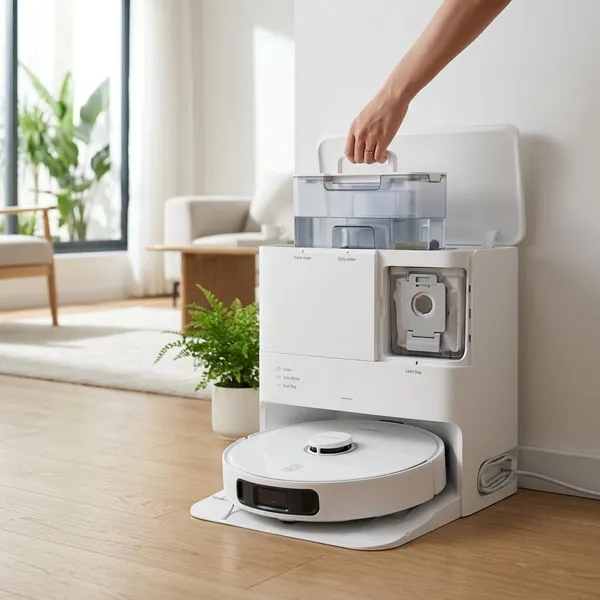
The dock is a major part of the buying decision. It charges the robot, empties dust, washes the mop pads, manages clean and dirty water, and dries the pads after cleaning. If you want a robot vacuum because you dislike daily floor chores, the dock is what makes the X20+ feel more automated than cheaper models.
The downside is size and upkeep. It needs a permanent spot with enough clearance, and you still have to refill water, empty dirty water, replace dust bags, and clean the tray. The benefit is that these jobs become occasional checks rather than tasks after every run.
Automatic dust emptying
Automatic dust emptying is especially useful in homes with pets, children, or a lot of crumbs. After cleaning, the robot transfers debris into a larger dock bag, so you are not handling the small onboard bin every day.
Xiaomi commonly advertises long dust-bag life, but real timing depends on your home. A quiet two-person flat may go much longer between bag changes than a busy household with a shedding dog and daily kitchen debris.
Automatic mop washing
The dock washes the mop pads so the robot is not dragging the same dirty pads across every room. That is important on larger floor plans, where an unwashed mop can start spreading residue instead of lifting it.
You should still rinse the wash tray when residue becomes visible. Think of the dock as reducing mop maintenance, not eliminating hygiene checks.
Mop air drying
Air drying is easy to overlook, but it helps prevent damp smells. This is especially valuable if you mop several times a week or live somewhere humid, where wet pads can turn musty quickly.
Clean and dirty water management
The station uses separate clean and dirty water tanks, often described as around 4 liters each. That gives the X20+ enough capacity for regular mopping without needing water attention after every short clean.
- Fill clean water before scheduled mop runs. Do not let the tank run low mid-clean.
- Empty dirty water often. Do it before odor becomes noticeable, not after.
- Rinse the tanks occasionally. This helps prevent film and stale smells.
- Wipe the dock area. A quick check catches splashes, residue, and hair buildup.
Routine brush and tray cleaning
The weekly check is simple: look at the main roller, side brush, wheels, mop tray, and dock base. If you see wrapped hair or dirty film, clean it before performance drops. Homes with pets or long hair should check more often than low-traffic homes.
Xiaomi X20+ app and smart features
The app is important because a good robot vacuum becomes annoying if you cannot control where it goes. The Xiaomi Home app lets you manage rooms, zones, schedules, suction, mopping levels, maps, and restricted areas. That flexibility is what turns the X20+ from a one-button cleaner into something you can fit around real routines.

Room and zone cleaning
Room and zone cleaning are the features you will probably use most. After cooking, send it to the kitchen and dining area. Before visitors arrive, clean the hallway and living room while leaving bedrooms alone.
This targeted use saves battery and reduces unnecessary wear. It also makes the robot feel less like a gadget and more like a quick household tool.
Cleaning schedules
Schedules work best when they match how your home gets dirty. A pet area may need daily vacuuming, while a guest room may only need a weekly clean. If noise is a concern, use do-not-disturb settings and avoid scheduling dock emptying during quiet hours.
Suction and mopping controls
The X20+ offers multiple suction levels and adjustable water output. Use a middle suction setting for normal rooms, stronger suction for rugs or pet zones, and lower water output on floors where you want to avoid excess moisture.
- Bedroom: quieter suction is usually enough.
- Kitchen: stronger suction plus mopping makes more sense.
- Entrance area: increase suction for grit and outdoor dirt.
Map customization
Map editing is worth doing properly. Split rooms if the automatic map gets boundaries wrong, add no-go zones around cables or pet bowls, and mark rugs that need special handling. A few minutes of map cleanup can prevent weeks of annoying mistakes.
Voice assistant support
Voice support through Amazon Alexa and Google Assistant is useful for simple commands such as starting, stopping, or sending the robot back to the dock. For detailed room choices, water levels, and map edits, the app is still the better control method.
Conclusion
The Xiaomi X20+ is a smart buy if your main goal is less daily floor work, especially in a home with hard floors, pets, rugs, and regular traffic. Its dock automation and useful mopping system are the real reasons to choose it, not just the suction number. I would be more cautious if your home is mostly thick carpet, short on dock space, or full of tight furniture gaps, because those are the situations where its convenience has clearer limits.